
Reference

Open Askasino on oma55 with Clear Controls

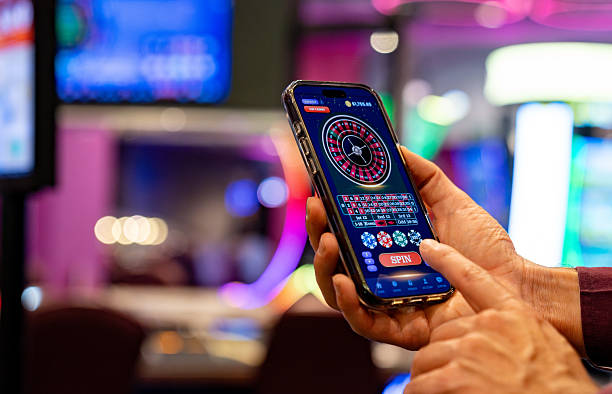
Askasino gives you a focused game screen on oma55, with the title, round controls and account status kept close together.

Focused game screenRound controlsPhone and desktopPhone verification
oma55 Open Askasino on oma55 with Clear Controls
oma55 Explore Askasino Before Choosing Your Stake

Explore Askasino Before Choosing Your Stake

Askasino is presented as its own game page rather than being mixed into the broader casino menu. We show the available round controls, stake choices and relevant game instructions in the Askasino panel so you can check the structure before taking part. The exact provider label and rules appear with the game entry, giving you a direct reference instead of relying on

a separate page. If you move between Askasino and titles such as Auto Roulette or Crash Games, your account remains in the same oma55 session.

  • Game entry — Open Askasino from the casino lobby and use the title panel to confirm that you have selected the intended game. The entry keeps the game name, visible controls and account route together, helping you avoid confusion when several casino titles sit beside one another.
  • Rules display — Before selecting a stake, read the rules shown inside Askasino and check how a round is opened, settled and recorded. We keep those details close to the action so you can make your own choice from the displayed game conditions.
  • Session path — Askasino stays connected to your oma55 account session while you browse nearby titles. You can compare its screen with Auto Roulette or romeobola, then return to Askasino through the casino lobby without creating a second account path.

SCREEN FEATURES

Try Askasino Through Three Clear Touchpoints

The Askasino screen is designed around the decisions you make during a round: identifying the game, checking the available stake controls and confirming the result area.

Updated today
oma55 Title confirmation
01

Title confirmation

The Askasino name remains visible when the game opens, giving you a simple check before you use any round control. This is useful when you have moved through the casino lobby from another title and want to confirm that the selected page is the one you intended.

oma55 Stake selection
02

Stake selection

Use the stake area shown by Askasino to inspect the available choices before confirming a round. We keep the selection within the game screen, allowing you to see the relevant amount and control together rather than switching between separate account pages.

oma55 Result reference
03

Result reference

After a round is settled, the Askasino display provides the result area used by that game. Check the on-screen record before moving away, then use the same oma55 account route if you need to compare your account balance or wallet status.

ROUND CONTROL

Browse Askasino Gameplay on Your Terms

Askasino gameplay is easiest to understand when you follow the visible sequence on the game screen: open the title, read the displayed rules, select from the available controls…

Entry step Log in to oma55, open the casino lobby and select…
Rule check Read the Askasino rule panel before choosing a round control.
Control flow Askasino keeps the main round actions in one visible area…
Wallet link Your Askasino activity uses the balance connected to your oma55…
PLAY DATA

Check Askasino Details Before Entry

We keep Askasino data close to the title so you can inspect the available game details before opening a round.

01

Game type

Askasino appears in the oma55 casino area as a dedicated game entry. Check the current title panel for its precise game type and round structure before taking part, since the displayed rules are the reference for the version available to your account.

02

Volatility

The Askasino page is where any volatility label or related game statistic is shown. Read that field before selecting a stake, and treat it as a description of game behaviour rather than a prediction of what your next round will produce.

03

Supported devices

You can open Askasino through a supported mobile browser or desktop browser, with the game controls adapting to the available screen. If the display is crowded, rotate your phone or continue on desktop before confirming an action.

04

Access region

Askasino access for Indonesia depends on local law and the region attached to your account. Sign in, check the game entry and follow the eligibility message shown there before attempting to open the game.

PHONE PLAY

Open Askasino Smoothly From Your Phone

Askasino is available through your mobile browser, so you can move from login to the game without installing a separate app.

Mobile browser entry
Touch-sized controls
Portrait screen check
Return to lobby
oma55 mobile gaming
ACCOUNT HELP

Get Askasino Help Near Your Account

When Askasino does not open as expected, start with the account path rather than repeating a round action.

Login check If Askasino returns you to the login screen, confirm your account details and complete any phone verification prompt shown by oma55. Include the exact Askasino message when contacting support so the account team can distinguish access trouble from a game-screen issue.
Wallet status If the Askasino balance does not match your account screen, pause the game and check the cashier record. For DANA, OVO, GoPay or QRIS questions, keep the payment receipt and status reference available when you ask for help.
Game access If Askasino is missing from the lobby, check the region message and whether access depends on local law. Support can use the game name, device type and time of the failed attempt to identify the route you followed.
FAIR PLAY DATA

See What Askasino Shows You

Our approach to Askasino is to keep the game reference visible and avoid adding claims that are not supported by the current title panel.

Provider label

The current Askasino game panel identifies the provider or source label attached to the title. Check that field on the page you open, because the label shown there is more useful than an unsupported provider claim in general casino copy.

Rules reference

Use the rules displayed inside Askasino as your reference for the round sequence and available controls. We do not replace those game-specific instructions with a generic casino explanation, and you can leave the page if the conditions are not clear.

Account security

Phone verification may be required before your oma55 account can access Askasino. Keep your login details private, check the account identity shown after sign-in and avoid sharing payment receipts or access codes with another person.

Result record

The Askasino screen provides the relevant result area after a round is settled. Check that display before leaving the page, then compare it with your account activity if the balance or round record does not appear as expected.

Region wording

Availability is shown through the account and game access message. For Indonesian access, eligibility depends on local law, so read the wording attached to Askasino instead of assuming that a title visible in one region will appear in every account.

Receipt trail

When a wallet question affects your Askasino balance, retain the payment receipt and status reference from the cashier. DANA, OVO, GoPay and QRIS records help support match the account event with the game session you were using.

LOBBY CHOICES

Compare Askasino With Nearby Titles

Askasino suits you when you want a dedicated game screen and a short route from the casino lobby to the displayed round controls.

01

Askasino

Choose Askasino when you want to inspect one focused game page with its own rule panel, stake area and result display. The title remains easy to identify when you return from the oma55 casino lobby or check your account route.

02

Auto Roulette

Auto Roulette is the nearby choice for roulette-specific controls and a wheel-based round structure. If you prefer those actions over the Askasino screen, open its separate title entry and read the displayed rules before selecting a stake.

03

Crash Games

Crash Games uses a different visual rhythm from Askasino, with the round display carrying more of the action. Compare the two pages by checking their respective controls and settlement wording rather than assuming that one set of rules applies to both.

04

onlinebingo

onlinebingo follows a number-focused format, so its screen differs from the dedicated Askasino layout. Select onlinebingo when that structure is clearer to you, or return to Askasino when you want its own controls and result area.

05

Fish Hunter

Fish Hunter offers an arcade-style alternative to Askasino, with visual target controls rather than the same game flow. Check the title and instructions after opening the lobby so your selected screen matches the type of round you intended.

06

romeobola

romeobola is another named casino entry beside Askasino. Its rules and controls should be read on its own page, making it possible to compare the two titles without carrying assumptions from one game into the other.

07

Your choice

Use the Askasino panel as the deciding reference: check the game type, available controls, displayed statistics and access message. This gives you a direct comparison with sibling titles while keeping the decision tied to the current account session.

ASKASINO PICKS

Discover Six Useful Askasino Details

A closer look at Askasino helps you decide whether its screen fits the way you prefer to use the casino lobby.

Named lobby entry Askasino has a clear title in the casino lobby, making…
Visible instructions The Askasino page keeps its game-specific instructions near the controls.
Phone-ready layout Use Askasino from a mobile browser with touch-friendly controls and…
Account connection Your Askasino session is connected to the account balance shown…
Local wallet route When you need to check account funding before entering Askasino…
Indonesia access Askasino is presented for Indonesian account access where local law…

Find Answers About Askasino on oma55

Before opening Askasino, you may want to confirm how the title appears, what to check on the game screen and how account access works from Indonesia. The answers below focus on this specific oma55 game rather than general casino functions. Read the current rules and access message on the page you open, then use the account support route if your screen or wallet record does not match what you expect.

Askasino is a dedicated casino game entry on oma55 with its own title panel, displayed instructions, round controls and result area. Open the game from the casino lobby, check the current rules and confirm the available options before selecting a stake.

Sign in to your oma55 account, complete phone verification if requested, open the casino lobby and select Askasino by name. Indonesian access depends on local law, so follow the eligibility message shown for your account before entering the game.

Yes, Askasino can be opened through a supported mobile browser without a separate app. Use the phone route from login to the casino lobby, check that the title and controls fit the screen, and rotate your device or switch to desktop if needed.

Read the instructions inside the Askasino game panel after opening the title from the lobby. That panel is the reference for the current round sequence, stake controls and settlement wording, so do not rely on rules from Auto Roulette or another nearby game.

Askasino is connected to the balance attached to your oma55 account session. Check the account display before entering, and use the cashier for wallet status or account funding through DANA, OVO, GoPay, QRIS, bank transfer or virtual account where available.

First check your login, phone verification status, device browser and the region message attached to Askasino. If the title still does not open, contact the account support route with the exact error, your device type and any visible wallet or access reference.

Askasino availability depends on local law and the region attached to your account. Sign in and read the access wording shown for the game before trying to enter. The same title may not appear under identical conditions for every account location.